Starlink Pause vs Standby: Plan Pausing, Standby Fees, and Hardware Sleep Explained
On this page
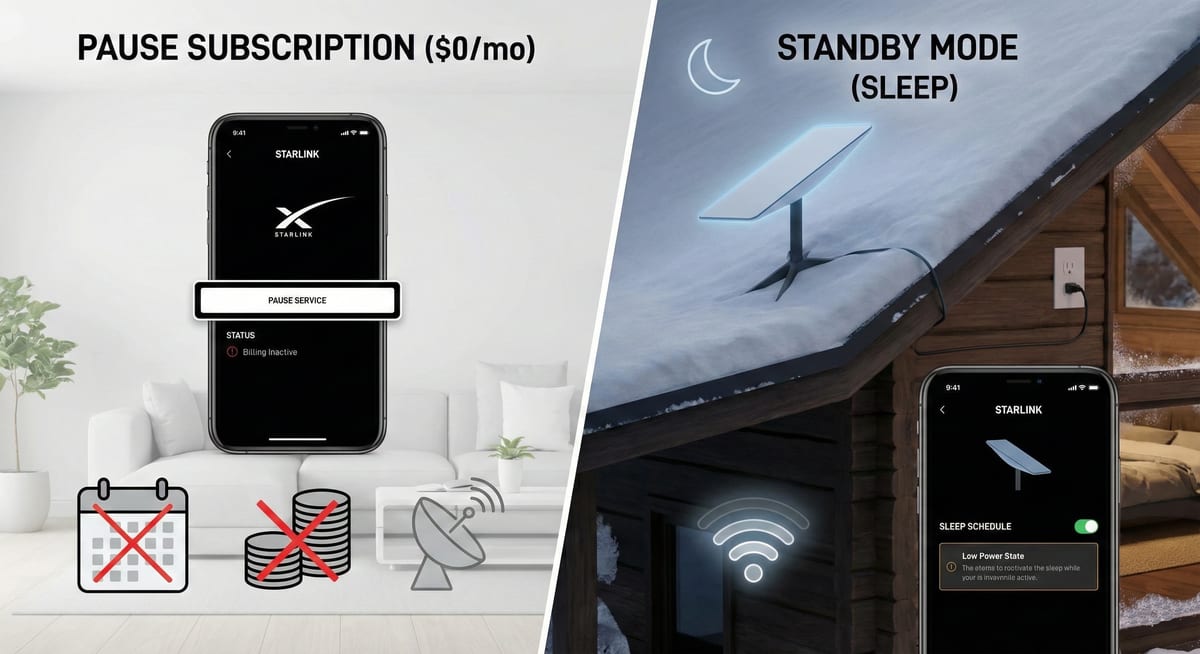
Starlink Subscription Pause (or Standby Mode) freezes your recurring monthly internet billing charges, while Hardware Sleep Schedule powers down the dish's phased-array transmitter overnight to conserve 30 to 60 watts of battery power. Pausing a subscription is managed in your online account at Starlink.com, takes effect at the end of your billing cycle, and maintains a low-speed telemetry link for off-grid reactivation. In contrast, hardware sleep is configured locally in the Starlink mobile app to silence the antenna during scheduled quiet hours without changing your subscription billing.
What is the difference between pausing a subscription and hardware sleep?
The confusion between Starlink pause and standby stems from mixing an account billing state with a hardware power state. Subscription Pause tells SpaceX to stop billing you for high-speed connectivity. Hardware Sleep Schedule tells your dish hardware to stop transmitting radio signals into the sky while you sleep, saving valuable watt-hours on off-grid battery setups.
| Feature | Subscription Pause / Standby | Hardware Sleep Schedule |
|---|---|---|
| Primary Purpose | Stop recurring monthly internet charges | Save 12V/120V battery power overnight |
| Configuration Location | Starlink.com Web Portal (Manage Subscription) | Starlink Mobile App (Settings > Sleep Schedule) |
| Internet Access | Low-speed telemetry portal data ($5/mo) or None | Disabled during programmed sleep window |
| Monthly Cost | $0 to $5/mo depending on regional tier | Normal active plan subscription cost |
| Hardware Power Draw | Full active power if left plugged in (25–100W) | Drops to ~11–15W (idle router only) |
| Activation Timing | Takes effect at the end of current billing cycle | Immediate during scheduled time window |
| Remote Setup | Yes (via any web browser or Starlink account) | No (requires direct connection to Starlink Wi-Fi) |
How does Starlink Standby Mode work in 2026?
According to the official Starlink Standby Mode support documentation, Standby Mode allows Roam and Residential subscribers to pause high-speed data while maintaining a dedicated low-bandwidth telemetry link to the satellite constellation. This solves a major pain point for travelers: previously, if you paused a Roam dish and drove into a remote national park with zero cellular reception, you had no way to access starlink.com to unpause. With Standby Mode, your dish connects just enough to open the Starlink App, load the account dashboard, and reactivate service on demand.
When does pausing and unpausing take effect on your bill?
Understanding Starlink's billing mechanics prevents unexpected credit card charges. When you click Pause Current Service, your high-speed internet remains active until the final day of your current monthly billing period. Starlink does not issue immediate refunds or pro-rated credits for pausing mid-month. When you click Resume Service, satellite connectivity is restored within minutes, and Starlink bills your card immediately for the pro-rated remainder of the current cycle. Per Starlink's published service terms and plan policies, there is no activation fee or demand surcharge when resuming service.
How to configure Hardware Sleep Schedule in the Starlink App
To cut power consumption on RV house batteries or solar generators, follow the official Starlink sleep schedule configuration guide:
1. Connect your phone directly to your local Starlink Wi-Fi network (remote configuration over cloud is disabled).
2. Open the Starlink App and navigate to Settings > Starlink > Sleep Schedule.
3. Toggle Enable Sleep Schedule to On.
4. Set your sleep start and wake times. Note that the Starlink app clock defaults to UTC time, so calculate your local timezone offset before saving.
5. Tap Save. During the sleep window, the dish phased array goes dormant, cutting power to ~11–15W while maintaining local Wi-Fi connectivity.
How does Standby Mode fit into the Starlink plan ecosystem?
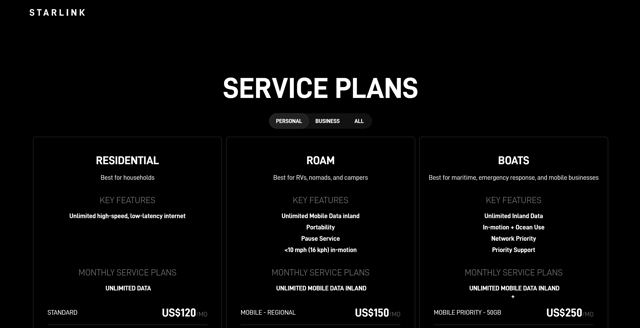
Before changing your service status, explore our detailed pricing matrix in the plans and pricing guide hub to compare Roam 50GB versus Unlimited tiers. If you are outfitting a campervan or overland rig, read our comprehensive Starlink RV and Roam field setup guide and verify your sky clearance with our obstruction checking walkthrough before mounting your dish.
Frequently Asked Questions
Does Starlink Standby Mode cost money?
Yes. In regions where Standby Mode is active, Starlink charges a small monthly maintenance fee ($5/mo or local equivalent) to keep low-speed emergency messaging and account portal connectivity active. In certain legacy Roam tiers without Standby Mode, a zero-dollar pause is available with all data disabled.
Can I unpause Starlink without cellular reception?
Yes. Standby Mode provides a dedicated low-bandwidth telemetry channel directly to the satellite constellation. Connect your device to your Starlink Wi-Fi network, open the Starlink App or visit starlink.com, and click Resume Service to reactivate high-speed data without any cell signal.
Why does the Starlink Sleep Schedule shut off at the wrong time?
The Starlink mobile app's sleep scheduler defaults to UTC (Coordinated Universal Time) rather than your local timezone. Always convert your local bedtime and wakeup times to UTC before saving the schedule.
Will I lose my Residential spot if I pause my service?
It is possible in congested areas. Starlink does not hold cell capacity for paused Residential accounts. If your local cell reaches maximum capacity while your line is paused, reactivating Residential service may be waitlisted, requiring you to resume on a Mobile Roam plan.